DriveHive — your own Android Auto launcher
An Android app that adds what Android Auto leaves out. On the car screen it shows the apps Android Auto hides (YouTube, Plex, PS Remote Play, Artemis, RetroArch, the Claude app), your Homey devices and flows, and a voice assistant that talks to Claude, GPT or a model of your own. It runs on the phone and needs nothing in the car beyond Android Auto, wired or wireless.
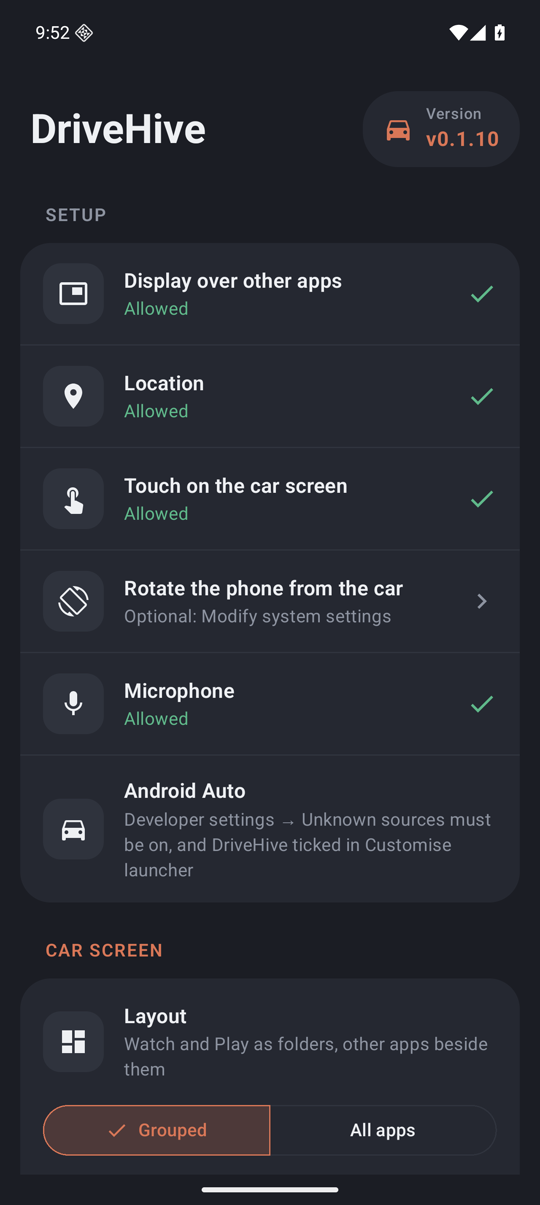
Status 2026-11-21: first test release, 0.1.x. Moving to a Google Play internal test.
Built for one car (Hyundai Tucson Hybrid 2026, wireless Android Auto, Samsung S24+) and tested on an Android 16 emulator. Android 11 or newer. Android Auto only shows apps of this kind when they were installed from Google Play, so DriveHive is distributed as an invite-only Play test; a copy installed from a file works on the phone but does not appear in the car. The source is private. Privacy policy.
What it does
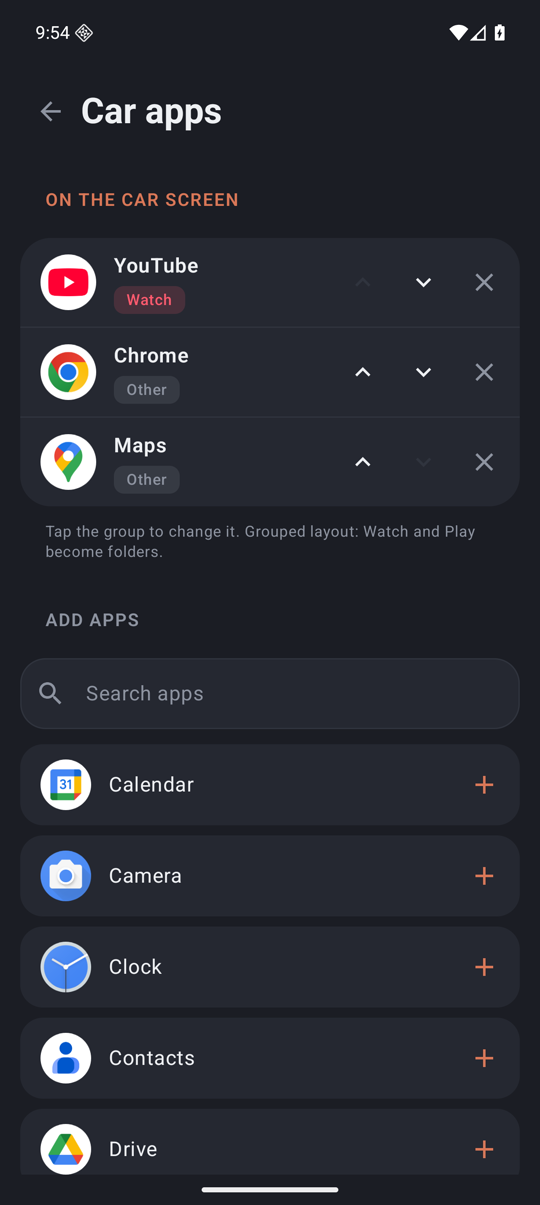
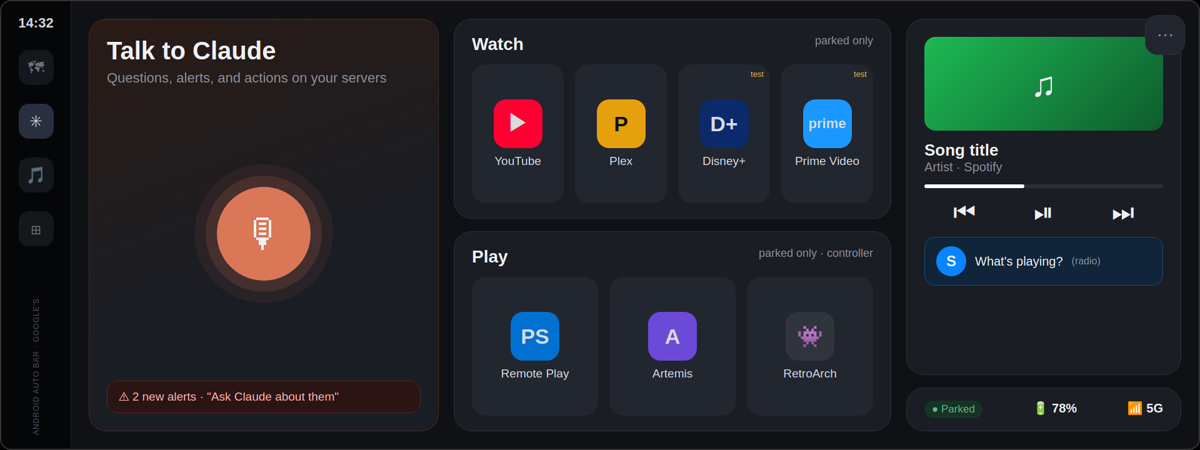
Apps on the car screen. Pick apps on the phone, put them in order and in a group. In the car they appear as tiles: Grouped turns Watch (YouTube, Plex, …) and Play (Remote Play, Artemis, RetroArch) into folders, All apps puts every app on one screen. App tiles carry the app's own icon; a folder shows the icons of the apps inside it. A tap shows the app mirrored on the car screen, with taps and scrolls passed back to the phone. Mirroring only works while parked.
Home. Your Homey favourites as tiles: flows start on a tap, lights and sockets switch, thermostats and airco get a screen with the current and target temperature and − / + buttons. Gates, garage doors and locks ask before they act. These tiles stay usable while driving: they use Android Auto's own driver-safe layouts, not mirroring.
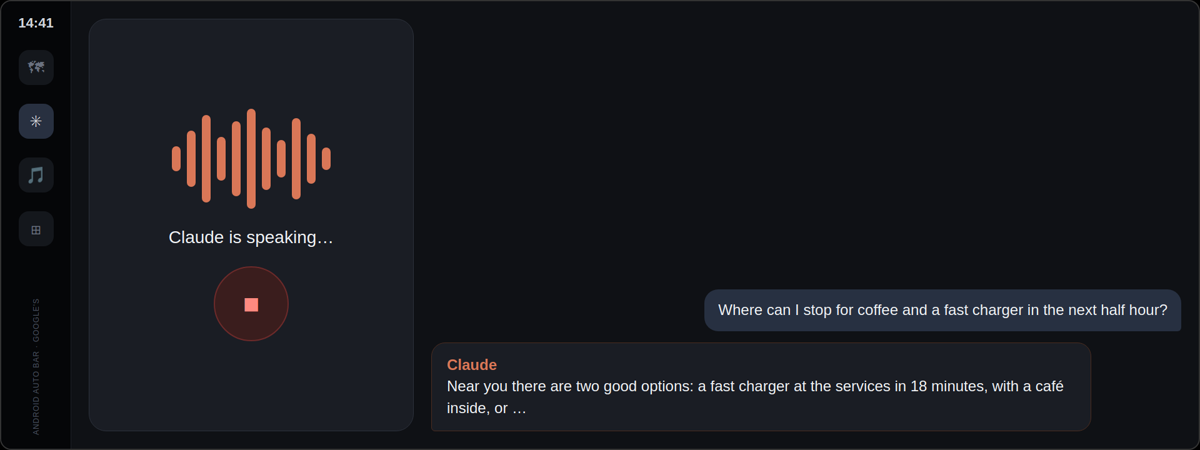
Car assistant. An Ask tile starts a spoken conversation from the car screen. The answer comes through the car speakers, then it listens again for a follow-up until you stop talking. It can use the Homey favourites too: "turn the airco to 20" works, "open the gate" asks first and acts on your "yes".
Install
DriveHive is an invite-only test on Google Play: ask for an invite, open the test link on the phone, and install it from the Play Store. Updates then arrive through Play like any other app.
Why not just the APK?
Android Auto has a developer setting, Unknown sources, for apps that do not come from the Play Store. Google's own documentation says it does not apply to apps built with the Android for Cars App Library, which DriveHive is, and Android Auto 18 indeed hides a sideloaded copy. The APKs on the download page are for testing on the phone only.
In the Android Auto settings → Customise launcher, make sure DriveHive is ticked.
Set up on the phone
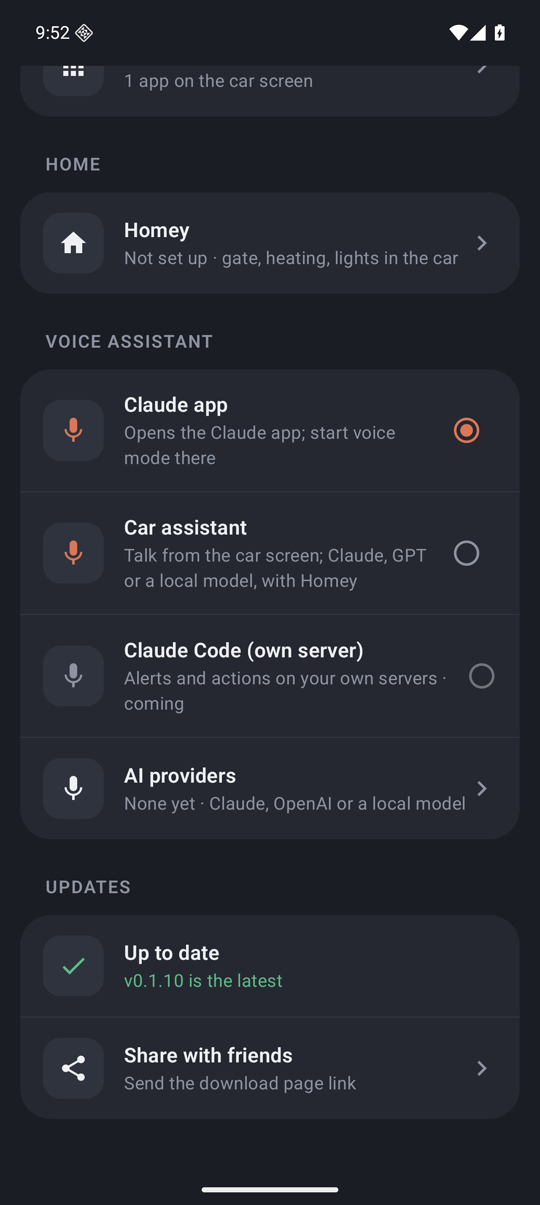
Open DriveHive on the phone. The Setup card lists what each feature needs and takes you to the right Android setting with one tap; a green tick means done.
| Setting | Needed for |
|---|---|
| Display over other apps | Opening an app on the phone from the car screen (Android blocks it otherwise). |
| Location | Mirroring: the phone's GPS speed decides whether you are parked. |
| Touch on the car screen | Tapping and scrolling in a mirrored app. Turn on DriveHive touch under Accessibility. For apps installed outside the Play Store Android first refuses with App was denied access; after that, Settings → Apps → DriveHive → ⋮ → Allow restricted settings (confirm with fingerprint or PIN), and the switch works. On Samsung, Auto Blocker can hide that option. |
| Rotate the phone from the car | Optional. With Modify system settings the rotate button in the car turns the phone to landscape, so videos and games fill the wide screen. The old setting comes back when you leave. |
| Microphone | The car assistant. |
Mirroring
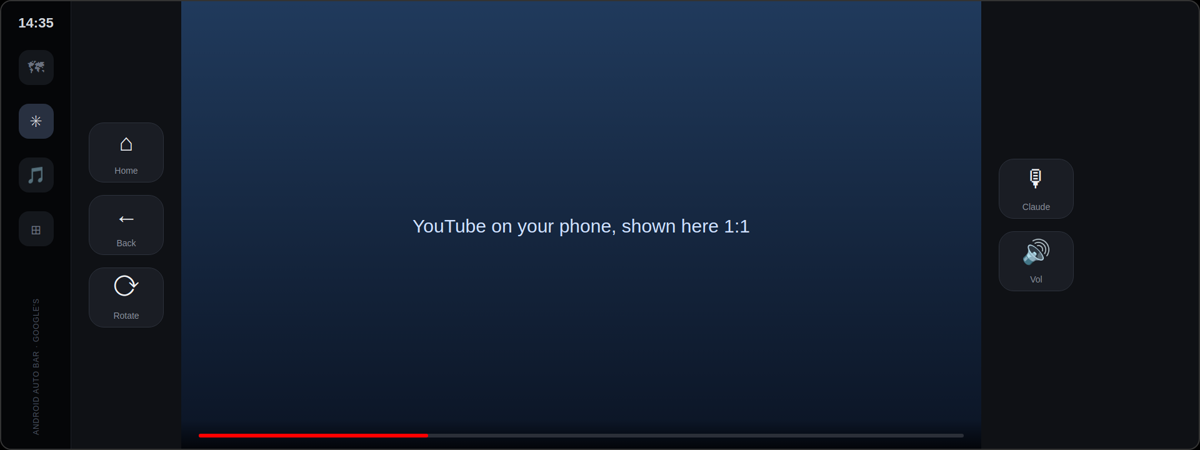
Tap an app tile in the car. The first time in a session the phone asks Share your screen with DriveHive? — tap Share screen (on the phone, while parked). The app opens on the phone and appears on the car screen. In the corner: back, rotate and close.
- Parked only. Above 10 km/h the picture is replaced by a message; it comes back after five seconds below 3 km/h.
- Portrait apps are small on a wide car screen. Use the rotate button for apps that can turn.
- Streaming services with copy protection (Disney+, Prime Video, Netflix) show a black screen: Android does not let any app capture them. YouTube, Plex and the game-streaming apps are not affected.
- Taps and scrolls work; pinch and multi-finger gestures do not, because Android Auto passes on only simple gestures. Games are played with a Bluetooth controller paired to the phone.
Home (Homey)
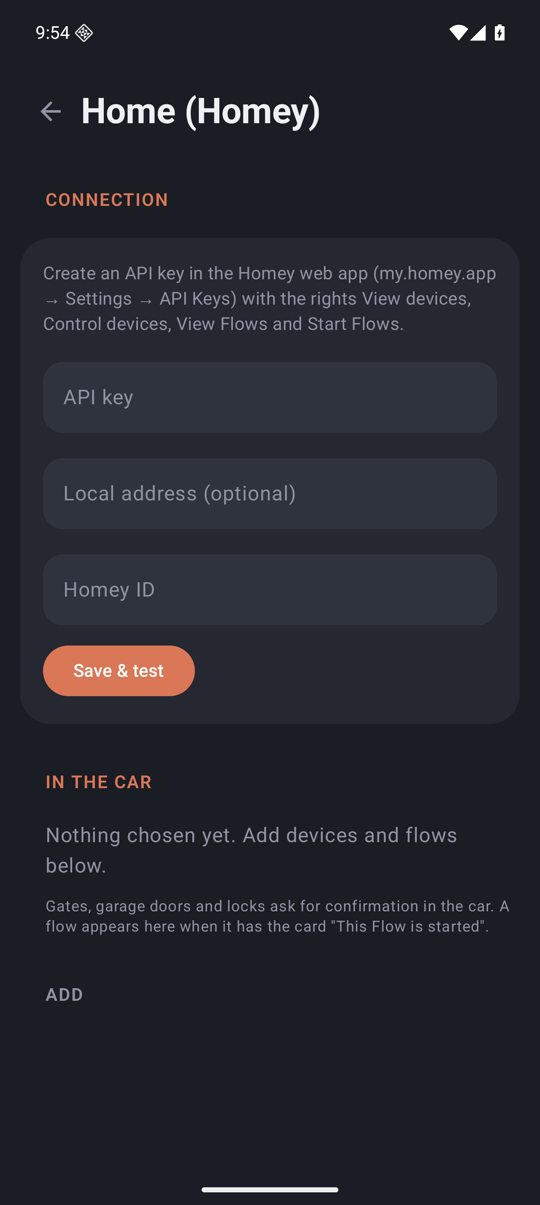
- In the Homey web app (my.homey.app) open Settings → API Keys and create a key with the rights View devices, Control devices, View Flows and Start Flows. Nothing more is needed.
- In DriveHive tap Homey, paste the key, and optionally enter Homey's address on your home network.
- Tap Save & test. On the home network the Homey ID fills itself in; otherwise copy it from the web app.
- Add devices and flows under Add, and order them under In the car.
At home DriveHive talks to Homey directly; anywhere else it goes through Homey's own cloud connection, so no VPN is needed. The API key is stored encrypted, with a key kept in the Android Keystore.
A flow appears in the list once it has the card This Flow is started; other flows cannot be started from outside.
Car assistant
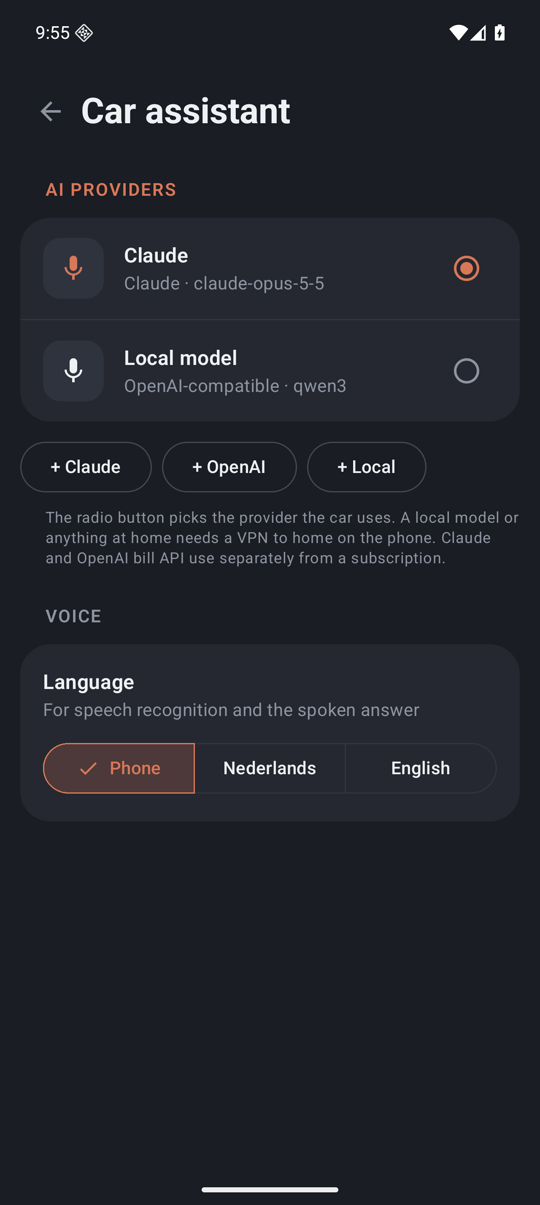
Under Voice assistant choose what the Ask tile does:
- Claude app — opens the Claude app on the phone; start its voice mode there. Uses your Claude subscription.
- Car assistant — the conversation runs inside DriveHive, with the provider you pick under AI providers.
Two kinds of provider cover nearly everything:
| Provider | Address | Notes |
|---|---|---|
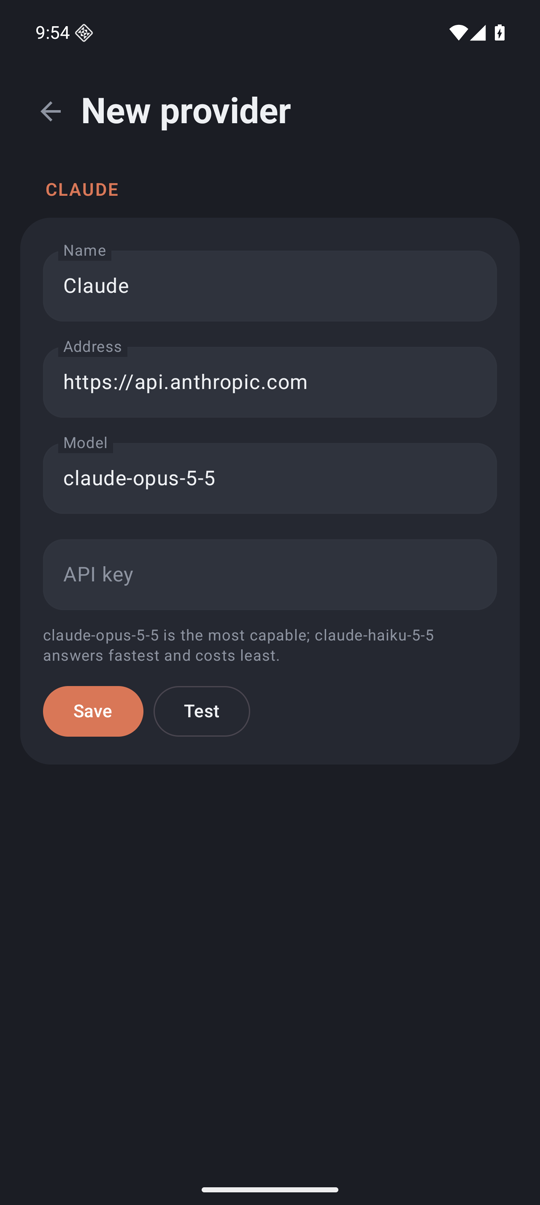
| Claude | https://api.anthropic.com |
Needs an API key from the Anthropic console; billed per use, separate from a Claude subscription. claude-opus-5-5 is the most capable, claude-haiku-5-5 answers fastest and costs least. |
| OpenAI-compatible | https://api.openai.com/v1, or your own server |
GPT, OpenRouter, and local servers such as llama-swap, Ollama or LM Studio. A server at home needs a VPN to home on the phone. |
Test sends one short question and shows the answer, so a wrong key or address shows up before you drive.
Speech recognition and the spoken answer use the phone's own voice services, so they work the same with every model. Language sets Dutch, English or the phone's language for both.
Updates
Installed from Google Play, DriveHive updates through Play and the Updates row says so. A copy installed from a file checks the download page each time it opens and offers Update there instead.
Safety
- Mirroring stops while driving. The Home tiles and the assistant stay available, because they are built from Android Auto's driver-safe layouts and voice.
- Gates, garage doors and locks (recognised by name) never act on a single tap or on the model's say-so: the car asks, and the app carries it out only after your "yes".
- The assistant can only touch the Homey devices and flows you put in the car, not the rest of the house.
Car screen design
The first release uses Android Auto's standard tile layout. These drafts show where the car screen is heading.
Planned
- Natural voices as an option: OpenAI and Google Gemini speech, and Claude's once Anthropic offers speech output. Today the Claude API answers in text only.
- Home Assistant and Shelly next to Homey, for homes without a Homey.
- "What's playing?": the title of the song on the radio.
- Claude Code on your own server: questions and actions on your own systems, by voice.
- Google starts requiring registered developers for apps installed outside the Play Store in 2027; DriveHive will use the free limited-distribution registration for a small number of devices.