SecretHive sign-in with Authentik
Status 2026-10-10
Verified against Authentik 2026.8: signing in through the public name, which made the account. Group mapping follows the same code as the rest and is tested against an in-process OpenID provider, not yet against Authentik groups.
The same steps apply to any OpenID Connect provider; only the screens on the provider's side differ.
What SecretHive expects from any provider
- A confidential client (client id and secret), authorization code flow with PKCE.
- Scopes
openid profile email. - ID tokens signed with a key the provider publishes, so SecretHive can check them (Authentik's default, RS256, is one). A token signed with a shared secret is refused.
- Redirect URI
{SecretHive base URL}/signin-oidc/{slug}.
A new account's user name comes from the configured claim (default preferred_username, which is the Authentik
username).
A first sign-in is refused when its user name or email address already belongs to a SecretHive account. Nothing is created and nothing is joined: an identity is never matched by name or address. That person signs in with their local account first, then connects the provider from their Profile.
1. Application and provider in Authentik
Admin interface → Applications → Applications → Create with provider.
Application
| Field | Value |
|---|---|
| Name | SecretHive |
| Slug | secrethive (part of the issuer URL) |
| Launch URL | https://<secrethive-host> (optional) |
Provider: type OAuth2/OpenID Provider.
| Field | Value |
|---|---|
| Authorization flow | default-provider-authorization-implicit-consent, or the explicit-consent flow |
| Client type | Confidential |
| Client ID / Client Secret | generated; copy both for SecretHive |
| Redirect URIs | Strict, https://<secrethive-host>/signin-oidc/authentik |
| Signing key | a certificate, for example authentik Self-signed Certificate |
Keep the default scope mappings openid, email and profile, and the subject mode Based on the User's hashed
ID. That subject stays the same when a username or email changes, which is what SecretHive links on.
Choose a signing key
Without one, Authentik signs ID tokens with the client secret, which SecretHive does not accept. Sign-in then fails after the Authentik login screen.
Created through the API or a blueprint? Set the grant types
The admin interface fills in the allowed grant types. A provider created through the API, a blueprint or
ak shell can end up with none, and every sign-in then fails with invalid_request, "The request is otherwise
malformed"; Authentik's server log says Invalid grant_type for provider. Allow authorization_code.
After saving, open the provider: OpenID Configuration Issuer shows the issuer URL, for example
https://auth.example.com/application/o/secrethive/.
2. Who may sign in
By default every Authentik user may open an application. For a key vault, restrict it: open the application →
Policy / Group / User Bindings, and bind a group such as SecretHive Users. Only its members can then sign in.
Signing in gives an account, not access. A new account has the server role user and no role in any vault.
3. Authentik groups to SecretHive groups (optional)
Authentik's default profile scope sends a groups claim with the names of the groups the user is in.
- In SecretHive, create a group per kind of access (Admin → Groups), and give each its role on a vault's Access card.
- On the SecretHive group, under Linked groups at a provider: the provider, and the Authentik group's name.
- On the provider's page in SecretHive, set Groups claim to
groups.
At every sign-in through Authentik, the memberships that came from Authentik are made to match the claim. Members added by hand are left alone. A change in Authentik takes effect at that person's next sign-in.
Provider groups give vault access, never administration
A provider's groups never make someone an admin or super admin of SecretHive. Those roles are set in SecretHive itself, under Admin → Users.
4. The provider in SecretHive
Admin → Providers (super admin):
| Field | Value |
|---|---|
| Name on the button | Authentik, or what your users call their sign-in |
| Slug | authentik (must match the redirect URI) |
| Issuer | the provider's OpenID Configuration Issuer |
| Client id / Client secret | from Authentik. The secret is stored encrypted under the master key |
| Scopes | openid profile email |
| User name claim | preferred_username |
| Groups claim | groups, or empty to leave memberships alone |
| Allowed email domains | empty, or your organisation's domains |
| Make an account for an identity nobody has connected | off, to connect only accounts an administrator made; on, to let everyone Authentik lets in get an account |
| Sign-in on | on |
The same through the API: PUT /api/v1/providers/{slug}.
People who already have a local account: sign in locally, then connect Authentik from Profile.
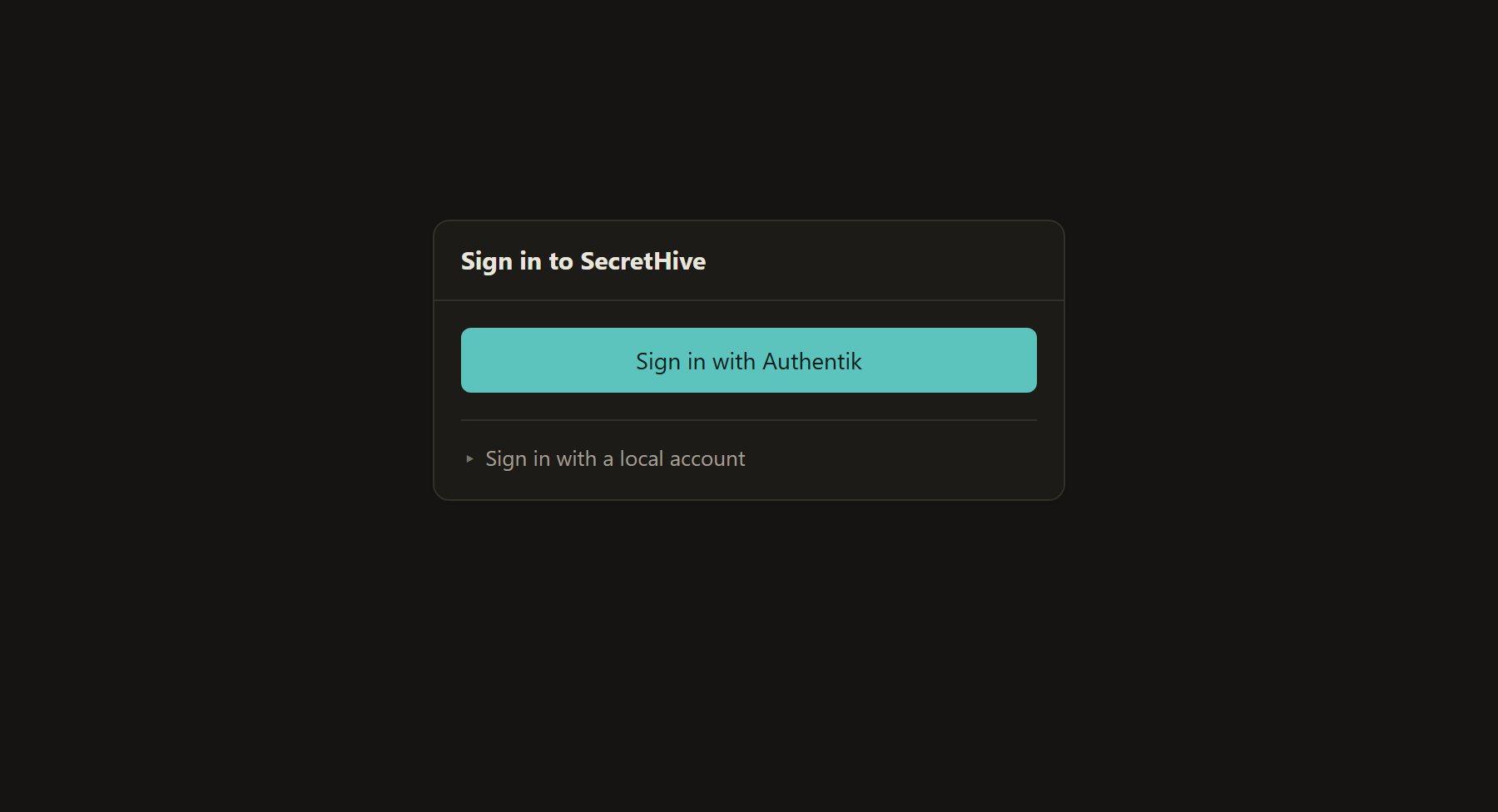
With a provider enabled, the sign-in page puts its button first and folds the local form away under Sign in with a local account. The local form stays available. Keep one local super admin for when the provider is unreachable.
The section about tokens on the API in the same form is for CI jobs; leave it off for sign-in alone. See CI jobs without a stored key.
5. Checks and troubleshooting
- Discovery answers:
<issuer>.well-known/openid-configurationreturns JSON whoseissueris the issuer URL. The SecretHive host must be able to reach Authentik at that address. - Behind a reverse proxy: set
SecretHive__PublicBaseUrlto the publichttps://address. The redirect URI is built from it, so it matches what is registered. invalid_request, "otherwise malformed": the grant types, see above.- Authentik shows "The request fails due to a missing, invalid, or mismatching redirection URI": the registered redirect URI differs (scheme, host, slug, trailing slash).
- Authentik shows "Permission denied": the user is not in a group bound to the application.
- A failure after the Authentik login screen, about the token's signature: no signing key on the provider.
- "No account is connected to that identity": the provider does not make accounts at a first sign-in. Turn that on, or make the account and let its owner connect the provider from the profile.
- "An account with that user name or email address already exists": by design, see above. Sign in locally and connect from the profile.
- Signed in and no vault to see: as intended. Someone with Vault Admin gives the account or its group a role.
- Groups not applied: check the groups claim, that the link uses the Authentik group's exact name, and sign in again. Memberships are refreshed at sign-in only.
A failed sign-in is in the audit trail with the provider's own reason.